

Key Takeaways
- Never automate high-stakes customer interactions entirely. Use AI to handle data gathering, but ensure a human handles emotional or complex resolutions to protect your brand reputation.
- AI output is only as reliable as your input. Clean and audit your spreadsheets and databases before syncing them with AI to avoid costly forecasting errors.
- AI models are prone to hallucinations, confidently stating false facts or laws. Always have a qualified professional review AI-generated legal, financial, or technical documents.
- Set specific ROI milestones for every AI tool to avoid getting trapped in a “sunk-cost fallacy” perspective toward them. If a platform doesn’t increase efficiency or reduce costs, adjust your approach or get rid of it.
If you’re using AI in your business operations, it’s probably because you want to get back more of your time and attention.
But findings in a recent study have shown that 8% of workers using AI actually ended up creating more work for themselves.
I want to make sure you’re in the group that scales… not the group that gets stuck.
Here are the five worst AI mistakes I see Treasure Valley small businesses make.
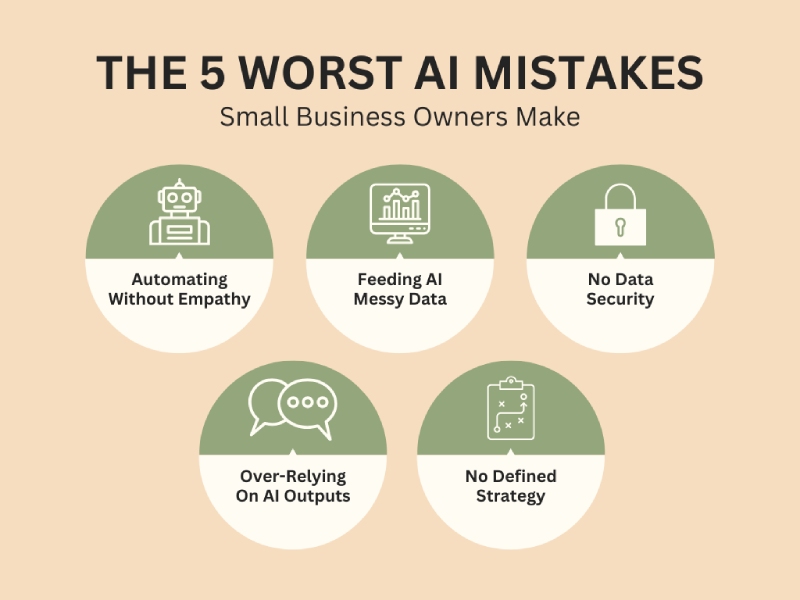
Mistake #1: Automating Without Empathy
If you’re using AI to do things like answer customer questions, handle support tickets, generate proposals, or write emails, it’s becoming the front door of your brand.
And where that goes wrong is when you connect a chatbot to your knowledge base and essentially walk away.
Say you own a boutique travel agency, and you install a standard AI agent to process cancellations. One client messages about canceling a honeymoon due to a sudden medical emergency. The AI agent responds:
“Great! I’ve processed your cancellation. Looking for your next adventure? Check out our Tropical Specials for 20% off!”
A technically efficient and relationally insensitive response.
AI doesn’t naturally detect tone, grief, frustration, or nuance unless you intentionally build systems to handle those moments.
Think of AI as the concierge. It gathers information, categorizes issues, and routes conversations. But when a message contains words like emergency, complaint, refund dispute, disappointed (or anything emotionally charged), the system should automatically escalate to a real person.
Mistake #2: Feeding AI Messy Data
AI is only as intelligent as the data you give it.
Many small businesses operate on years of spreadsheets with duplicate entries, outdated pricing, inconsistent naming conventions, and one-off events buried in historical reports.
If you feed that kind of data directly into AI forecasting or decision tools, you’ll get distorted conclusions.
For example, let’s say a local HVAC company implements AI forecasting to predict summer inventory demand. Their system includes prior-year data that contains unusually large bulk orders from a commercial developer who later goes bankrupt.
The AI projected a demand spike, so the owner took out a short-term loan to stock up on inventory.
That inventory sat in the warehouse for nearly a year.
Before implementing forecasting or financial modeling tools, make sure your data:
- Has no duplicates or obvious errors
- Is limited to the last 24 months, unless older data is specifically needed
- Has unusual events clearly tagged so they are not treated as repeatable patterns
Because an algorithm can’t distinguish between a fluke and a trend unless you tell it to.
Mistake #3: No Data Security
Maybe your staff pastes client contracts, intake notes, payroll data, tax IDs, medical information, or internal financials into free AI tools to summarize them faster.
Later, someone actually reads the tools’ terms of service to discover that the platforms may retain data, store prompts, or use submitted information to improve their models.
Now, that productivity shortcut is a privacy exposure.
Make sure to deliberately review every AI platform’s privacy policy before approving it for company use. You’re looking for policies about data retention, data sharing, security controls, and whether user inputs are used to train the system.
Some platforms allow users to opt out of having their content used for training purposes. Make sure to locate that option and disable data sharing for training wherever possible.
And regardless of how strong a system’s security claims appear, your team should never input sensitive information into any AI system.
That includes client data, proprietary company information, payroll records, financial statements, tax IDs, medical details, and anything else that would cause harm if disclosed.
Because security promises are not a substitute for discipline. Once sensitive data leaves your controlled environment, you’ve increased your exposure.
Mistake #4: Over-Relying On AI Outputs
AI sounds decisive and presents answers in complete paragraphs. But it doesn’t know things the way a professional does.
It predicts words based on patterns. That means it can cite policies that don’t exist, misstate legal requirements, miscalculate numbers, and invent sources.
Let’s say you own a small services firm and you used AI to draft a payroll policy update. The language looked polished. But it referenced overtime rules for your state incorrectly.
You copied it into your handbook, and a wage complaint followed.
One of the worst AI mistakes you can make is looking to AI as an authority. Treat it as a draft assistant.
Every AI output should be reviewed by a human, especially if it’s producing anything that affects:
- Payroll
- Contracts
- Refund policies
- Regulatory compliance
- Customer rights
AI can draft. A qualified human approves.
Mistake #5: No Defined Strategy
I see a lot of Boise business owners subscribe to tools because their competitors are using them, or because a webinar made the software look transformative.
Or even because “AI-powered” feels like insurance against being left behind.
But without a defined objective, that tool just becomes another monthly charge.
And those tools accumulate fast: Marketing AI. Writing AI. Meeting AI. Sales AI. Forecasting AI. Chatbot AI. HR AI.
Before long, you’re paying for six overlapping tools. And still reviewing everything manually because you don’t trust the outputs.
So, before adopting any AI system, define 1) what measurable outcome you’re trying to achieve and 2) how you’ll track whether the tool is actually boosting profitability.
Over time, as you’re using AI tools, make sure you’re evaluating how much time you’re actually saving and what errors you’re reducing (or introducing).
The last thing you want is to spend a year integrating expensive AI systems only to discover they haven’t reduced labor hours, increased margins, or improved customer retention in any meaningful way.
Track each tool’s ROI. Review it quarterly. If it’s not working, adjust your approach or quit using it.
Final thoughts
When you slow down enough to define the proper guardrails and review standards, that’s when AI really starts making your business more productive.
If reading this has made you realize you’re making some major AI mistakes, let’s clean up your system.
Although I won’t position myself as an expert on every AI tool out there, I can help you identify the best areas of opportunity for improving efficiency in your Treasure Valley business. And I can help you reliably measure your chosen AI tools’ improvement in those areas.
FAQs
“Why is my AI tool creating more work instead of saving time?”
One of the worst AI mistakes you can make is not having a defined strategy. If you implement a tool without a clear objective, you end up spending more time correcting the AI’s typos, double-checking its math, or fixing its tone than you would have spent doing the task yourself. Treat AI as a draft assistant, not an automated replacement.
“How do I stop my AI chatbot from sounding cold to customers?”
To keep your brand’s empathy intact, set up automated escalation triggers. Program your system to flag emotionally charged words like emergency, refund, disappointed, or manager. When the AI detects these, it should immediately route the conversation to a human.
“Can I use free AI tools for summarizing client contracts or payroll?”
It’s not advisable. Most free AI platforms use your inputs to train their future models, meaning your sensitive data could technically become part of the public knowledge base. Before using any AI tool for business, check the privacy policy for data training opt-outs. And never paste Tax IDs, payroll records, or proprietary client information into an AI prompt.
“How does messy data ruin AI forecasting?”
AI reflects whatever you feed it. If your spreadsheets have duplicate entries, outdated pricing, or one-off fluke events, the AI will see those as a permanent trend. Before you let AI predict your future inventory or sales, clean your data. Limit the AI’s view to the last 24 months and manually tag unusual events so the algorithm knows not to repeat them.
“Is AI legally reliable for drafting company policies or handbooks?”
No. AI is a probabilistic engine, not a legal expert. It can confidently cite labor laws or tax codes that don’t actually exist. While AI is great for creating a rough outline of a payroll policy or employee handbook, a qualified human (or legal counsel) must review and approve every word before it becomes official company policy.
“How do I know if an AI tool is actually worth the monthly subscription?”
Start looking at measurable outcomes. Every quarter, ask yourself if the tool has reduced labor hours, increased my profit margins, or improved customer retention. Audit your full AI stack every 90 days and cut anything that isn’t providing a clear return on investment.